Awugh: A Bold Handwritten Font for Modern Web Design
I was staring at a blank hero section on a client’s coaching website, trying to break the monotony of standard sans-serif layouts. The brief asked for something "bold," "confident," and "nostalgic," but most script fonts felt either too delicate or too messy for a professional digital environment. That was when I pulled Awugh from my font library. It wasn’t just another decorative typeface; it felt like a design decision that could anchor the entire brand identity.
If you are a web designer, UI creator, or digital entrepreneur looking to add personality without sacrificing clarity, Awugh is worth a closer look. This Script Amp font brings a handwritten energy that reads as strong and dynamic, making it an excellent choice for headlines, logotypes, and high-impact web content.
First Impressions: Testing Awugh in a Digital Layout
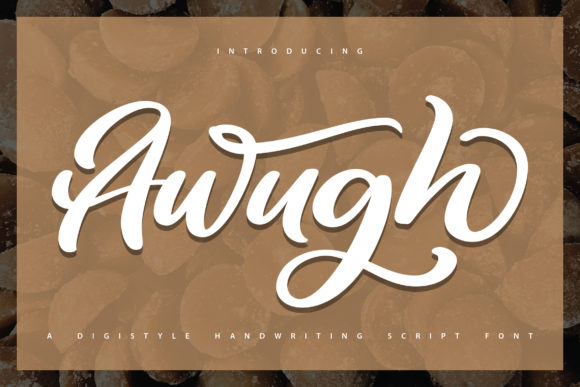
The first thing I noticed when dragging Awugh into Figma was its weight. Unlike many script fonts that rely on thin hairlines which often disappear on mobile screens, Awugh has substance. It feels sturdy. When I placed it over a dark image banner for a boutique online store project, it didn’t get lost in the background noise. Instead, it commanded attention immediately.
This is crucial for modern web design. Users scan pages quickly. If your headline font is too intricate or lacks visual weight, you lose engagement within seconds. Awugh strikes a balance between artistic flair and legibility. It doesn’t try too hard to be "calligraphic"; instead, it feels like confident marker strokes on paper. This authenticity translates well to digital interfaces, where users crave human connection amidst sterile code.
Visual Personality and Mood
Awugh carries a distinct mood: nostalgic yet modern. It evokes the feeling of vintage signage or hand-painted shop fronts, but with a clean finish that suits contemporary aesthetics. For creative professionals—photographers, designers, and artists—this font can instantly elevate a portfolio homepage. It suggests creativity and effort, qualities that build trust with potential clients.
However, it’s not just for art portfolios. I tested it on a course sales page for a digital marketer. The bold, handwritten style broke up the text-heavy layout, making the offer feel more personal and less corporate. It added tons of nostalgic charm while maintaining a professional edge. The font reads as strong and confident, which subconsciously reassures visitors that the business behind the site is established and reliable.
Strategic Placement: Where Awugh Shines
In web design, typography is about hierarchy. You don’t use every font for every element. Awugh is best utilized as a display font. Here is how I recommend integrating it into your projects:
- Hero Sections: Use it for the main headline. Its bold nature grabs attention instantly. Keep the subheadings in a simple sans serif font to maintain readability.
- Call-to-Action (CTA) Areas: While buttons usually benefit from clean sans serifs, using Awugh for short phrases like "Get Started" or "Join Now" can create a memorable, branded experience. Just ensure there is enough contrast against the button background.
- Section Headings: Break up long-form blog posts or landing pages with Awugh headers. It guides the eye and adds visual rhythm to the scroll.
- Logo Design and Branding: For small businesses, startups, or personal brands, Awugh can serve as a unique logotype. Its distinctive character helps in building a recognizable brand identity across social media graphics and packaging designs.
- Digital Ads and Banners: In fast-scrolling social feeds, bold handwritten text stands out. Awugh’s dynamic strokes capture the eye faster than rigid geometric fonts.
Avoid using Awugh for body copy. No matter how stylish a font is, if users have to struggle to read paragraphs of text, they will leave. The goal is to enhance the user experience, not hinder it. Think of Awugh as the jewelry of your design—it should accentuate, not overwhelm.
Readability and Mobile Responsiveness
One of the biggest challenges with script fonts is responsiveness. On a desktop monitor, a large headline looks great. But on a smartphone screen, complex letterforms can blur or become illegible.
Awugh performs surprisingly well on smaller devices because of its clear structure. The letters are distinct, and the connections between them are logical. However, I always recommend testing your chosen font size carefully. For mobile layouts, I typically scale down the hero text slightly and increase the line height to prevent crowding.
When placing Awugh over images, contrast is key. I often use a semi-transparent overlay or a drop shadow to ensure the white or light-colored text pops against busy backgrounds. This technique preserves the font’s aesthetic while guaranteeing accessibility standards are met. Remember, good UX design is inclusive; your typography should be readable for everyone, including those using screen readers or those with visual impairments.
Font Pairing for a Polished Look
Pairing a bold handwritten font like Awugh requires restraint. The rule of thumb is simplicity. Since Awugh is visually loud, your supporting typography should be quiet.
For a modern web design look, pair Awugh with a clean sans serif font. Fonts like Inter, Roboto, or Open Sans provide a neutral canvas that lets Awugh shine. This combination works perfectly for tech startups, SaaS landing pages, and minimalist e-commerce stores.
If you are going for a more editorial or luxury feel, consider pairing Awugh with a classic serif font. The contrast between the organic, rough edges of the script and the structured elegance of a serif creates a sophisticated tension. This pairing is ideal for fashion blogs, high-end product launches, and creative agency sites.
Avoid pairing Awugh with other script fonts. Unless you are a typographic expert, combining two handwriting styles often results in a chaotic and unprofessional appearance. Stick to one display font per layout to maintain visual harmony.
Technical Considerations for Web Implementation
Before dropping Awugh into your CSS, check the technical details. Not all premium fonts are created equal when it comes to web implementation.
- File Formats: Ensure the font package includes WOFF2 formats for optimal loading speeds. Slow-loading fonts hurt your SEO and user retention.
- Weights and Styles: Check if Awugh comes in multiple weights. Having access to lighter or italic variations can give you more flexibility in your design system without cluttering the page with too many different typefaces.
- Licensing: Verify the commercial license. Using a font on a client’s website or a monetized landing page usually requires a specific web font license. Skipping this step can lead to legal issues later.
- Multilingual Support: If your audience is global, check if the font supports accented characters and other languages. Awugh’s stylistic choices might limit its utility for non-Latin scripts, so plan your multilingual content accordingly.
Building a Cohesive Brand Identity
Typography is more than just picking pretty letters; it is about consistency. When you choose Awugh for your headlines, make sure it aligns with your overall brand voice. Is your brand playful? Bold? Nostalgic? Awugh fits well within these categories.
I recently used Awugh in a digital brand kit for a small business owner. We paired it with earthy tones and simple line icons. The result was a cohesive visual language that felt both handmade and professional. This consistency helped the brand stand out in a crowded market. Whether you are designing a campaign landing page, a blog header, or a full e-commerce site, having a signature font like Awugh can tie everything together.
Ultimately, Awugh is a tool for storytelling. It tells your visitors that you care about details, that you value craftsmanship, and that you aren’t afraid to stand out. In a digital world dominated by uniform templates, a bold handwritten font can be the difference between a forgettable page and an unforgettable experience. Test it, play with it, and see how it transforms your next web project.